
- Select a full fibre broadband provider below to find everything about its service.
- Compare the speeds, prices and offers for your chosen provider to pick the best deal for you.
- The checker includes all national providers and a wide range of alternative networks across the UK.
Speeds shown are typical average download and upload figures. Prices are the current monthly cost for new customers and change regularly.
Full fibre broadband explained
Full fibre uses fibre optic cable for the entire connection to your home. It is also known as fibre to the premises (FTTP) or fibre to the home (FTTH).
Data travels as pulses of light instead of electrical signals through copper wiring. This allows much faster speeds and removes the speed loss caused by the length of the copper line from a street cabinet.
Most installations include an optical network terminal (ONT) inside the property, connected to the router by Ethernet. Some networks integrate the optical equipment into the hub, so a separate ONT is not present in every full fibre home.
Full fibre and part-fibre compared
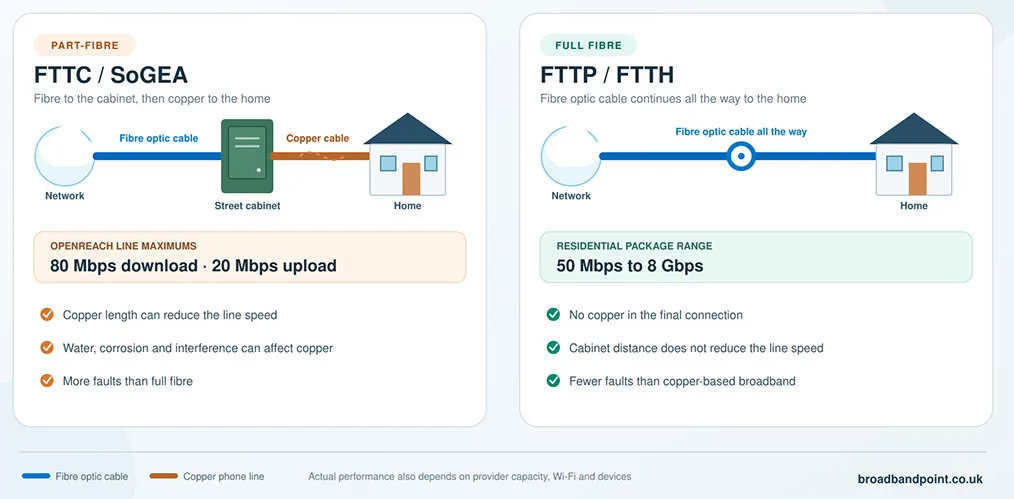
Part-fibre broadband, usually FTTC or SoGEA, carries data by fibre to a street cabinet and uses copper for the final connection. Openreach FTTC lines offer maximum speeds of 80Mbps download and 20Mbps upload. Common packages offer average download speeds of 35Mbps or 67Mbps, but an individual line slows as the copper section gets longer.
FTTP removes the copper section. Residential packages range from 50Mbps to 8Gbps, depending on the provider and area. Distance from a street cabinet no longer reduces the line speed, although network capacity, Wi-Fi and your devices still affect performance.
Full fibre avoids many faults associated with old copper lines, including corrosion, water entering joints and electrical interference. Damaged cables and equipment can still cause outages, but full fibre records fewer faults than copper-based broadband.
Main benefits of full fibre
- Faster packages: Full fibre offers gigabit and multi-gigabit download speeds that FTTC cannot deliver.
- Better upload options: Upload speeds range from modest figures on Openreach-based packages to speeds equal to the download speed on symmetrical networks.
- More reliable lines: Fibre is less affected by poor weather and electrical interference than copper.
- Additional bandwidth: Several people can stream, make video calls, download games and use cloud services at the same time.
Full fibre can reduce latency, the delay between sending a request and receiving a response. This benefits gaming and video calls, but provider routing, Wi-Fi and the destination server also affect the result.
FTTP is not a dedicated end-to-end connection. Passive optical networks share capacity between a group of premises, so congestion can still reduce speeds when local or backhaul capacity is insufficient. Full fibre nevertheless offers far more capacity than FTTC.
Symmetrical and asymmetrical upload speeds
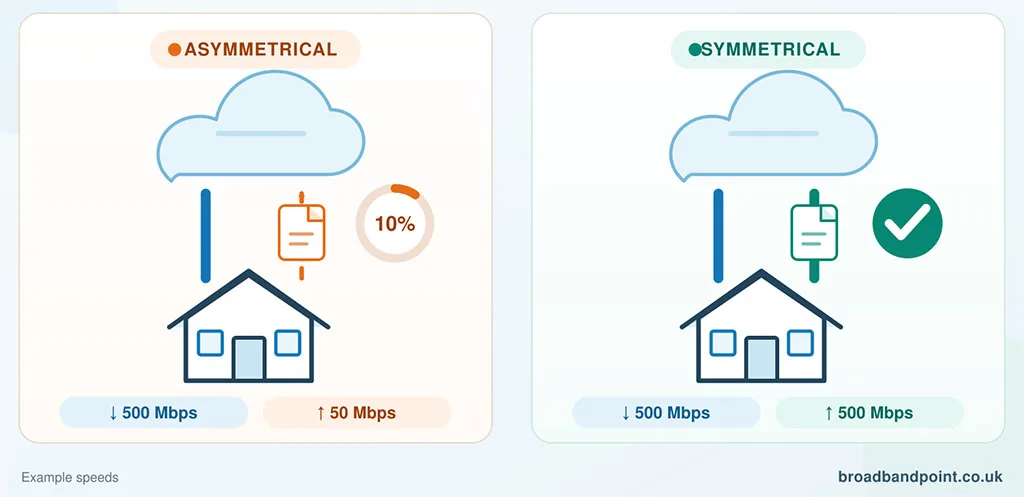
An asymmetrical package offers a faster download speed than upload speed. This remains common among providers using Openreach and on Virgin Media’s cable network.
For example, Sky’s Openreach Full Fibre 500 package offers average speeds of 500Mbps download and 60Mbps upload. Virgin Media Gig1 offers average speeds of 1,130Mbps download and 104Mbps upload on its cable network.
A symmetrical package offers an upload speed equal to the download speed. It is useful for cloud backups, large work files, video uploads, livestreaming and several simultaneous video calls.
Several full fibre providers offer symmetrical packages:
- YouFibre offers equal upload and download speeds across its full fibre range, reaching 8Gbps at selected premises.
- Community Fibre offers symmetrical packages in London, including a 5Gbps service in eligible areas.
- Hyperoptic offers equal upload and download speeds on its 150Mbps, 500Mbps and 1Gbps packages where available.
- Gigaclear offers 300Mbps, 600Mbps and 900Mbps packages with equal upload and download speeds in its rural coverage areas.
Sky also offers average 2.5Gbps and 5Gbps upload and download speeds over CityFibre in selected areas. Vodafone offers symmetrical packages on several alternative networks, while Virgin Media offers an upload-speed add-on that raises uploads to the same speed as downloads on its newer full fibre network.
A typical household that mainly streams, browses and makes video calls does not need symmetrical broadband. A 30Mbps upload speed is sufficient for these activities. Faster uploads become valuable when several people send large files or use cloud services at the same time.
UK full fibre networks and providers
Most providers buy access from a network operator and add their own pricing, router, contract conditions and customer service.
Openreach operates the largest UK full fibre network. More than 19 million premises can order an Openreach FTTP service, with a target of 25 million by December 2026. BT, EE, Plusnet, Sky, TalkTalk, Vodafone and Zen use it. Most residential Openreach packages offer lower upload speeds than download speeds.
Virgin Media uses its established cable network and a newer XGS-PON full fibre network. Its packages reach up to an average 2,000Mbps download speed, with optional symmetrical uploads available on the full fibre network.
CityFibre passes more than 4.5 million premises and is used by more than 30 providers, including Vodafone, Sky, TalkTalk, Zen, Rise Fibre and toob. Retail speeds and upload figures still differ between them.
Other full fibre networks include Netomnia, Hyperoptic, Community Fibre, Gigaclear, Fibrus, G.Network and Ogi. Their coverage is smaller, but many offer symmetrical speeds and competitive prices.
Vodafone now uses Openreach, CityFibre, Community Fibre, OFNL and Virgin Media full fibre infrastructure, while Sky uses Openreach and CityFibre. The provider name alone therefore does not confirm your upload speed or fastest available package.
Full fibre availability in the UK
As of January 2026, full fibre was available to 24.9 million UK homes, equal to 82% of residential premises. Gigabit-capable broadband reached 27.1 million homes, or 89%. The second figure is higher because it also includes gigabit cable services that are not FTTP.
Coverage can change from one property to the next because construction depends on ducts, poles, wayleaves and local restrictions.
Use a postcode and premises checker rather than town-level coverage. Confirm the network, download and upload speeds, installation requirements and provider choices for your home. If Openreach FTTP is unavailable, its fibre checker can show whether work is planned. Check local full fibre networks separately.
Full Fibre Broadband Availability Checker
Details to check before switching
Total contract cost and annual increases
New broadband contracts taken from 17 January 2025 cannot use inflation-linked or percentage-based annual price rises. Any scheduled increase must be stated in pounds and pence before you order.
Current new-customer contracts add £4 a month on 31 March each year with BT, EE and Plusnet, £3.50 each April with Vodafone and £4 each April with Virgin Media. Zen fixes the monthly broadband price for the contract period. A £4 increase applied for the final 12 months adds £48, so compare the full contract cost rather than the opening price.
Router and Wi-Fi equipment
The speed reaching your router and a wireless device will differ. Walls, interference, distance and the device’s Wi-Fi standard reduce wireless performance.
EE includes a Wi-Fi 7 Smart Hub 7 Plus with full fibre. BT’s Smart Hub 3 uses Wi-Fi 6, Vodafone includes a Wi-Fi 6 Power Hub with standard broadband and a Wi-Fi 7 Ultra Hub 7 with Pro 3, while Plusnet’s Hub Two uses Wi-Fi 5. Check whether mesh units or a whole-home Wi-Fi guarantee cost extra.
Use Ethernet for the fastest and most consistent connection. Gigabit and multi-gigabit packages also need compatible router ports, cables and devices.
Minimum guaranteed speed
Check the minimum guaranteed download speed for your premises and the remedy if performance remains below it. Under the broadband speeds code, unresolved speed problems can give you the right to leave without an early termination charge.
CGNAT and static IP options
Some providers use carrier-grade network address translation (CGNAT), which lets several customers share one public IPv4 address. Browsing and streaming continue normally, but port forwarding, server hosting, some peer-to-peer games and remote access can fail.
YouFibre and toob use CGNAT as standard. A public static IPv4 address currently costs £5 a month with YouFibre and £8 with toob. Check this if you use remote cameras, a home server, a personal VPN or port forwarding.
Landline and alarm compatibility
The analogue Public Switched Telephone Network is due to retire on 31 January 2027. This does not mean every copper broadband line stops on that date. It means traditional analogue calls are moving to digital phone services, usually through the broadband router.
Digital phone service relies on broadband equipment and mains power. Tell the provider before switching if you use a telecare alarm, medical pendant, lift phone or monitored alarm. Some full fibre packages include no home phone service.
Installation and switching
A first FTTP installation can require an engineer to bring fibre from a pole or underground duct into the property. Check setup charges, landlord permission and the planned location of the ONT and router.
One Touch Switch lets most residential customers move between networks by contacting only the new provider. Confirm number transfer separately if retaining a landline number is important.
Choosing a suitable speed
An average 100Mbps to 150Mbps download speed is sufficient for most typical households. Packages offering 300Mbps to 500Mbps are better suited to larger households, frequent game downloads and many active devices.
Gigabit and multi-gigabit packages are most useful for heavy users who regularly transfer very large files or have many devices active at once. Their full benefit often requires Ethernet, Wi-Fi 6E or Wi-Fi 7 equipment and compatible devices.
Start with the networks available at your premises, then compare download speed, upload speed, the total contract cost and router equipment. These details give a more accurate comparison than choosing the package with the largest download figure.