
A broadband router is one of the most important parts of your home internet setup. It takes the connection coming into your home and shares it with your devices, either over Wi-Fi or through Ethernet cables. In simple terms, it is the device that turns your broadband line into a working home network.
Most UK broadband packages include a router, often called a hub. Some are basic dual-band models for everyday use. Others come with newer Wi-Fi 6 or Wi-Fi 7 technology, better range, faster wireless performance and extra features such as mesh add-ons, app controls or mobile backup.
If your internet feels slow, the router is often part of the story, but not always the full answer. The broadband package, the layout of your home, the age of your devices and the way you connect them all affect the speeds you actually see.
This guide explains the basics, the different router types now offered with UK broadband packages, the role of wireless and Ethernet, the best ways to improve your Wi-Fi speeds and the providers that currently include the best routers.
Five providers offering the best routers now
As of April 2026, five UK providers stand out more clearly than the rest for router quality.
EE
EE is one of the best choices right now for customers who want advanced router hardware with full fibre. Its newer Smart Hub range includes Wi-Fi 7 on selected packages, and the higher-end Smart Hub 7 Pro adds tri-band Wi-Fi 7 on premium services.
That gives EE an advantage for homes with lots of connected devices, newer hardware and faster packages. It is especially attractive if you want more than basic wireless performance from the router included with the broadband deal.
Vodafone
Vodafone is another better choice, especially through its Pro packages. The Ultra Hub 7 brings Wi-Fi 7 into the package, and Vodafone also pairs it with mesh boosters and 4G backup on some Pro options.
That combination makes Vodafone attractive for homes that care about coverage as much as speed. It is also a better choice for customers who want a package with a clear whole-home approach rather than just a single router.
Sky
Sky has improved its hardware significantly at the faster end of its range. Its advanced hub now brings Wi-Fi 7 to selected full fibre packages, including very fast services.
Sky becomes more attractive when paired with its WiFi Max add-on or included premium coverage options on selected packages. For households that want easier coverage improvements and stronger app-based features, Sky is now a much better choice than it used to be.
Community Fibre
Community Fibre remains one of the best choices in London for customers who want fast broadband and up-to-date router hardware. It uses different router models depending on the package, with Wi-Fi 6 on lower plans and Wi-Fi 7 hardware on higher-speed services.
That stepped approach makes sense because faster plans get router hardware that is more suitable for making the most of those extra speeds. If you are inside its coverage area, Community Fibre is one of the better choices for router quality and value together.
YouFibre
YouFibre is one of the better choices for customers who want very fast full fibre and current router technology as standard. It now includes Wi-Fi 7 across its router range, with stronger hardware again on its fastest packages.
That gives it a clear advantage over providers still using older Wi-Fi 5 or standard Wi-Fi 6 routers on mainstream deals. If your home already has newer devices and you want a package with router hardware that does not feel behind the times, YouFibre is one of the best choices available.
Best Broadband Providers Checker
UK broadband providers and the routers they offer in 2026
| Provider | WiFi Router Model | Features |
|---|---|---|
| BT |
Smart Hub 2
(WiFi 5)
|
Dual-band 4 x Gigabit Ethernet DECT for Digital Voice Smart Scan Complete WiFi compatible USB port |
| EE |
Smart Hub 7 Plus
(WiFi 7)
Smart Hub 7 Pro
(WiFi 7)
Smart Hub 6 Plus
(WiFi 6)
|
Dual-band
1 x 2.5Gb LAN 3 x 1Gb LAN 1 x 2.5Gb WAN Guest network Parental controls Security features
Tri-band
4 x 2.5Gb LAN 1 x 2.5Gb WAN Guest network Parental controls Security features Digital Home Phone support
Dual-band
4 x 1Gb LAN 1 x 2.5Gb WAN Parental controls Security features WiFi Extender 6 support |
| Sky |
Gigafast+ Hub
(WiFi 7)
|
WiFi 7 hub Works with Sky WiFi Max Sky Max Pod compatible My Sky app controls Advanced security with WiFi Max Parental controls with WiFi Max Device priority with WiFi Max |
| Vodafone |
Ultra Hub 7
(WiFi 7)
Power Hub
(WiFi 6)
|
WiFi 7
Mesh boosters on Pro packages 4G broadband backup Secure Net Home Vodafone app setup Full fibre ready
Dual-band
Full fibre ready Vodafone app setup |
| Virgin Media |
Hub 5
(WiFi 6)
Hub 5x
(WiFi 6)
|
Dual-band
1 x 2.5Gb Ethernet 3 x 1Gb Ethernet Gig1 ready
Dual-band
1 x 10Gb Ethernet 3 x 1Gb Ethernet XGS-PON full fibre support |
| TalkTalk |
Wi-Fi Hub 3
(WiFi 6)
|
WiFi 6 Mesh technology Up to 128+ devices Full fibre ready Digital Voice support on supported services |
| Hyperoptic |
Hyperhub
(WiFi 6)
|
Dual-band 4 x 1Gb LAN MU-MIMO Total WiFi mesh add-on Phone support on supported services |
| Community Fibre |
Linksys MX20
(WiFi 6)
Linksys M60
(WiFi 7)
Linksys M62
(WiFi 7)
|
Dual-band
Linksys mesh platform Used on lower and mid-speed packages
Dual-band
1 x 2.5Gb WAN 3 x 2.5Gb LAN Used on 1Gbps to 2.5Gbps Premium packages
Tri-band
1 x 10Gb WAN 1 x 10Gb LAN 2 x 2.5Gb LAN Used on 5Gbps Premium package |
| YouFibre |
YouFibre Hub
(WiFi 7)
YouFibre Hub Pro
(WiFi 7)
|
Dual-band
3 x 1Gb LAN 1 x 2.5Gb LAN 1 x 2.5Gb WAN Guest WiFi Parental controls Split SSID Phone port
Tri-band
4 x 1Gb LAN 1 x 10Gb LAN 1 x 10Gb WAN Guest WiFi Parental controls Split SSID Phone port |
| Zen Internet |
FRITZ!Box 7530 AX
(WiFi 6)
eero Pro 6E
(WiFi 6E)
|
Dual-band
4 x Gigabit LAN Guest network Parental controls DECT base station Mesh-ready
Tri-band
Mesh-ready eero app setup Guest network Security add-ons |
| Cuckoo |
eero Pro 6E
(WiFi 6E)
|
Tri-band Mesh-ready eero app setup Guest network Security and privacy features Suitable for 100+ connected devices |
| brsk |
brsk Hub
(WiFi 7)
|
WiFi 7 2.5G WAN port Phone port Dashboard controls Works with BetterWiFi boosters |
| Trooli |
Zyxel EX5601 / EX5600-T Series
(WiFi 6)
|
Dual-band AX6000 2.5G Ethernet gateway Zyxel MPro Mesh WiFi Plus booster option |
Broadband router basics
A broadband router connects your home to the internet and then shares that connection with multiple devices.
That includes:
- phones
- laptops
- tablets
- smart TVs
- games consoles
- smart speakers
- cameras and other smart home devices
On older broadband services, the router often includes the modem function as well. On full fibre, the router usually connects to a separate fibre box on the wall, often called an ONT. The ONT brings the fibre service into your home, while the router manages the network inside the home.
The router also assigns internet access to each device, manages local traffic and creates your wireless network. That is why router quality matters so much. A better router can improve Wi-Fi coverage, reduce congestion and deliver faster wireless speeds to newer devices.
Wireless and Ethernet
There are two main ways to connect devices to a router: wireless and Ethernet.
Wireless, or Wi-Fi, is the convenient option. It lets you connect phones, tablets and laptops without cables. It is the default choice for most homes because it is flexible and simple to use.
Ethernet is the wired option. You plug a cable directly from the router into the device. This usually gives a more reliable connection and is often the best option for devices that stay in one place.
Ethernet is ideal for:
- desktop PCs
- smart TVs
- streaming boxes
- games consoles
- work devices used for video calls
- any device that regularly downloads large files
If you want to check the true speed of your broadband line, Ethernet is the best test. Wi-Fi results can drop because of distance, walls, interference or limits on the device itself.
Wi-Fi is still the right choice for most day-to-day use, but Ethernet remains the better choice when you want the most reliable connection and the lowest latency.
Router types now offered with broadband packages
As of April 2026, UK broadband providers offer several clear router types.
Wi-Fi 5 routers
These are older dual-band routers using 2.4GHz and 5GHz bands. They still work well enough for basic browsing, streaming and general use, but they are no longer the best choice for faster full fibre packages or busy homes with lots of connected devices.
Some mainstream providers still include Wi-Fi 5 hardware on certain packages.
Wi-Fi 6 routers
Wi-Fi 6 brought better performance in busy homes, improved efficiency and faster wireless speeds for compatible devices. It remains a good choice for many households, especially on mainstream full fibre packages.
A good Wi-Fi 6 router is still suitable for:
- HD and 4K streaming
- gaming
- video calls
- homes with multiple users online at once
Wi-Fi 7 routers
Wi-Fi 7 is now appearing on more premium broadband packages and, in some cases, on standard full fibre deals too. It offers faster wireless speeds, lower latency, better performance in busy homes and, on some models, access to the 6GHz band as well.
For customers with newer phones, laptops and tablets, Wi-Fi 7 can deliver a clear improvement over older hardware.
Mesh systems and boosters
Some providers now include mesh units or offer them as add-ons. These extra devices work with the main router to improve coverage across larger homes.
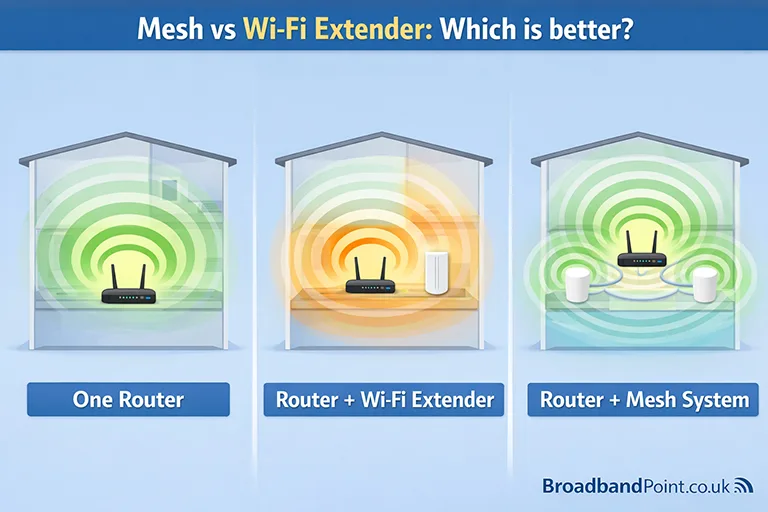
A mesh setup is often the better choice if:
- the router cannot reach every room properly
- the home has thick internal walls
- there is a loft conversion, extension or garden office
- upstairs Wi-Fi is much weaker than downstairs
Mesh systems usually give better results than basic repeaters because they are better at maintaining speed and connection quality across the home.
Router limits and speed issues
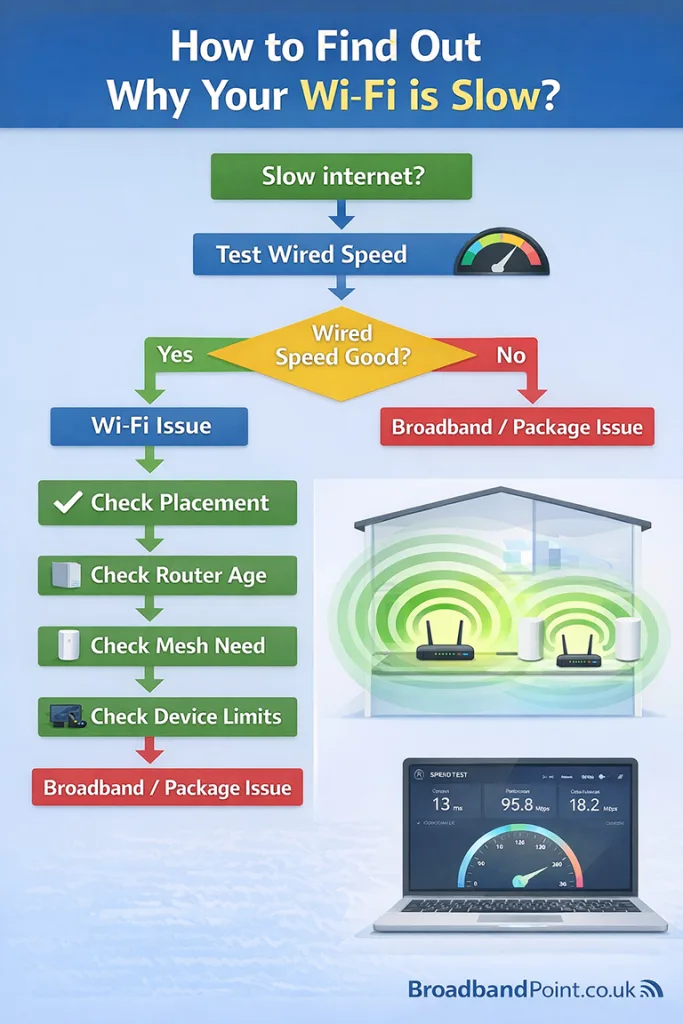
A router can fix some speed problems, but it cannot fix every problem.
If your broadband package is slow, a new router will not turn it into gigabit broadband. The router can only share the connection that your package already provides.
That means the first step is to separate broadband speed from Wi-Fi speed.
If your wired Ethernet result is slow, the issue is more likely to be:
- the package speed
- a line fault
- network congestion
- a provider issue
If your wired result is good but Wi-Fi is poor, the issue is more likely to be:
- an old router
- poor router placement
- weak signal in some rooms
- interference from other devices
- older client devices with slower Wi-Fi capability
A better router can improve wireless performance in several ways. It can deliver stronger coverage, cope better with many active devices and provide faster speeds to newer hardware. It can also improve consistency, which matters just as much as peak speed in daily use.
So yes, a broadband router can fix speed issues, but only when the router is the weak point.
Setting up a router properly
Router setup is now easier than it used to be, especially on full fibre services.
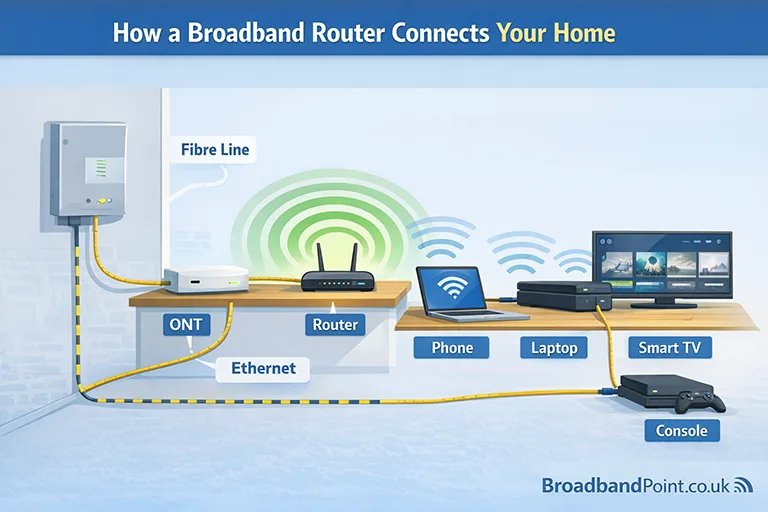
The basic process is straightforward:
- Connect the router to the ONT or broadband socket using the supplied cable.
- Plug in the power adapter and switch the router on.
- Wait for the status light to show the connection is live.
- Connect your phone, laptop or tablet using the Wi-Fi name and password printed on the router.
- Open the provider app or follow the browser setup page if required.
Once the router is online, take a few extra steps to improve security and performance.
- Change the default Wi-Fi password if needed.
- Change the router admin password.
- Check that automatic firmware updates are enabled.
- Add a guest network if visitors often use your Wi-Fi.
- Place the router in the best possible location before connecting everything else.
A poor setup can reduce performance before you even start using the service. A good setup gives the router the best chance to deliver the speeds your package can provide.
Getting the fastest wireless speeds
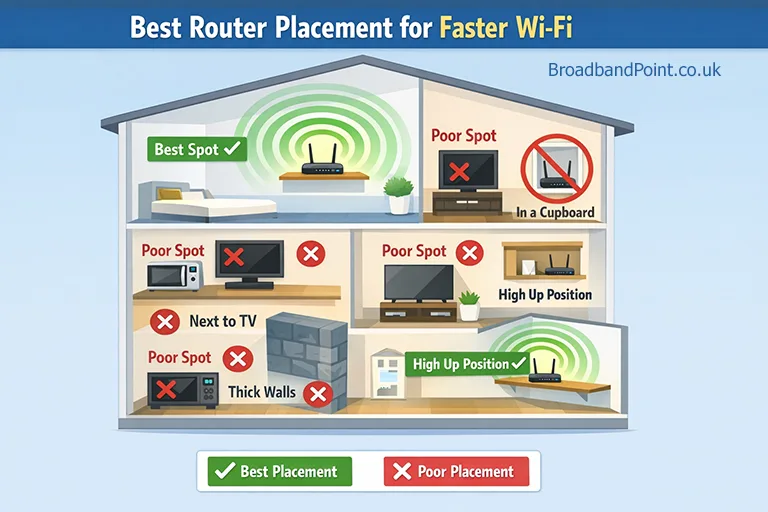
If you want faster Wi-Fi, router placement is the first thing to fix.
Put the router:
- in a central part of the home
- out in the open
- on a shelf or table rather than on the floor
- away from thick walls and large metal objects
- away from TVs, cordless phones, baby monitors and microwaves
Do not hide it in a cupboard or behind furniture. That is one of the most common reasons for weak signal and lower wireless speeds.
The next step is to connect the right devices in the right way. Devices that use a lot of data should go on Ethernet when possible. That frees up wireless capacity for the devices that need Wi-Fi.
It also helps to understand the Wi-Fi bands.
- 2.4GHz gives longer reach but slower speeds
- 5GHz gives faster speeds over a shorter distance
- 6GHz, available on some newer Wi-Fi 6E and Wi-Fi 7 routers, gives extra bandwidth for compatible devices
In a smaller flat or a typical two-bedroom home, a single well-placed router may be enough. In a larger home, a mesh system is often the better answer.
Device age also matters. A very old phone or laptop will not suddenly deliver top Wi-Fi 7 speeds just because the router is newer. Your router and your device both need the right wireless technology to get the best result.
The best router features to look for before switching
If you are comparing broadband deals and the included router matters to you, focus on these features.
Wi-Fi standard
Wi-Fi 6 is still good. Wi-Fi 7 is better for customers who want the newest hardware and who already own compatible devices.
Dual-band or tri-band
Dual-band routers use 2.4GHz and 5GHz. Tri-band models add another band, often 6GHz on newer Wi-Fi 7 routers. This can improve performance in busy homes.
Mesh compatibility
If your home is large or has weak spots, a router that works well with mesh units is a major advantage.
Fast Ethernet ports
For gigabit broadband and above, faster Ethernet ports are important. They matter for wired PCs, switches and other high-performance devices.
App controls and security tools
A good provider app makes setup easier and gives you simple control over guest access, parental controls and device management.
Backup options
Some premium packages now include 4G backup, which helps keep the home online during certain faults or outages.
Conclusion
A broadband router does much more than send out a Wi-Fi signal. It is the centre of your home network, and its quality has a direct effect on coverage, wireless speeds and everyday reliability.
If your broadband feels slow, do not assume the provider is always at fault. Check the wired speed first, then check the Wi-Fi setup inside the home. In many cases, the biggest gains come from better router placement, a newer router, Ethernet for fixed devices or a proper mesh system.
For most UK households, a modern Wi-Fi 6 router is still perfectly good. For faster full fibre packages and homes with lots of newer devices, Wi-Fi 7 is now the better choice.
As of April 2026, EE, Vodafone, Sky, Community Fibre and YouFibre offer some of the best routers included with UK broadband packages. If router quality is high on your priority list, these are the providers worth checking first.